User Control in the Age of AI: What Firefox's New "AI Off" Switch Means for Digital Autonomy
Firefox’s new “AI off” switch challenges the default spread of AI in tech, raising bigger questions about consent, user choice, and what digital autonomy should look like in an AI-saturated internet.

AI is everywhere right now and you did not exactly sign up for all of it. It is in your search results, your phone's keyboard, your email suggestions, your browser. Most of the time, nobody asked. It just showed up. So when a browser company actually decided to let you flip it off, that is worth paying attention to.
Firefox just announced something that feels almost radical. They have included in their browser a single toggle that lets you shut off every AI feature in the browser. One switch and it is done.
No more hunting through menus figuring out which AI thing is doing what. Mozilla is calling it "Block AI enhancements," and it is landing in Firefox 148 on February 24th. And, it matters.
How We Got Here
To understand the toggle, you need a little backstory. In December 2025, Mozilla appointed a new CEO, Anthony Enzor-DeMeo, and his first big move was announcing that Firefox would evolve into a "modern AI browser." For a company that built its entire reputation on privacy and user choice, that landed like a slap. The backlash was fast.
Users flooded Reddit, social media, and Mozilla's own forums. An open letter on the Firefox subreddit called out a disconnect between Mozilla's talk about "agency and choice" and the reality that nobody had actually been asked. People were frustrated, not because AI is inherently bad, but because it was being imposed without consent.
Mozilla heard them. Within days, the company confirmed that they were already working on a full AI kill switch. Mozilla posted on Mastodon about it, saying they had been calling it exactly that, the "AI kill switch, and that the name reflected how seriously they were taking things.
Enzor-DeMeo himself went on Reddit to address the community, writing that Firefox would always remain "a browser built around user control." Big words but words are easy. The real test was whether the product would back them up.
What the Switch Actually Does
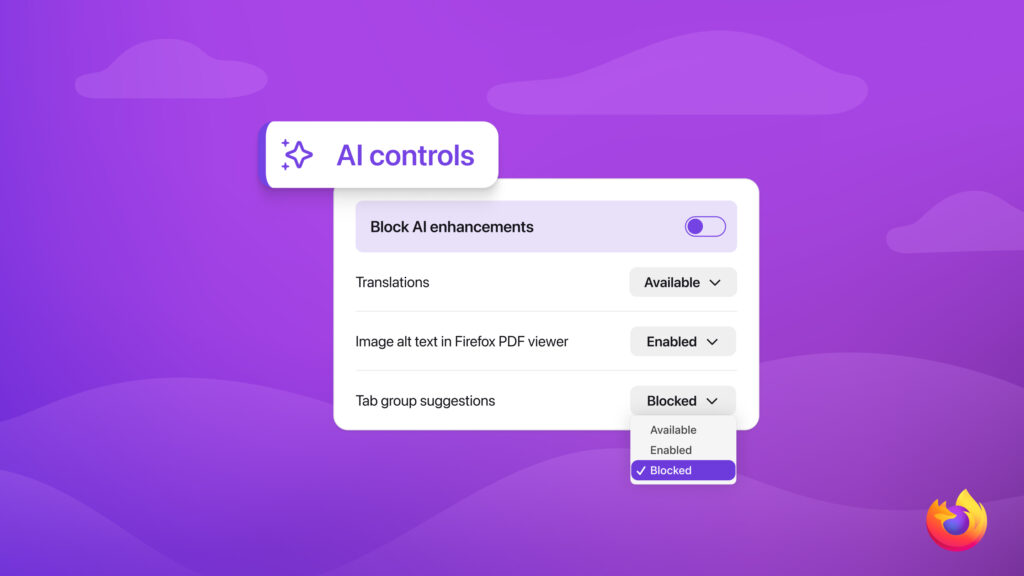
Let’s break it down. Starting with Firefox 148, there is a new "AI controls" section in your desktop browser settings. At the top, there will be a master toggle labeled "Block AI enhancements."
Turn it on, and Firefox blocks all of its built-in AI features both the current ones and any future ones added down the line. That includes AI-powered translations, automatic alt text for PDFs, AI tab grouping suggestions, link previews, and the AI chatbot sidebar (which supports tools like ChatGPT, Claude, Gemini, and others).
But, you don't have to go all or nothing. Underneath the master toggle, there are individual switches for each feature. Want translations but not the chatbot? Fine. Want tab grouping but nothing else? Also fine. It is granular control like the kind of thing that should be standard but isn't.
One important note is that the toggle only governs Firefox's own AI features. If a site you visit has its own AI tools, Firefox isn't blocking those. That is a fair and honest boundary.
Why This Actually Matters
The reason this is generating buzz is not just because of a toggle in a single browser. It is because almost no one else is doing this. Google, Microsoft, Apple have been including AI into their products at every level, and finding a simple global opt-out is nearly impossible.
You might find a setting here, a buried menu item there, but a clean, one-click "no AI" option is rare. Vivaldi has been vocal about resisting AI bloat, but Firefox is one of the first mainstream browsers to actually build the infrastructure for it.
This matters because it sets a precedent. If users respond well, and early signals suggest they will, it puts pressure on every other platform to offer something comparable. The idea that digital autonomy should include the right to say no to AI is just common sense. But in 2026, common sense and tech industry defaults are not always the same thing.

The Bottom Line
Firefox's AI off switch is not going to change the world overnight. AI isn't going anywhere, and most tech companies are not going to suddenly become user-centric because one browser changed the script. But it does prove that user choice and AI innovation aren't mutually exclusive. You can have both.
And if a company is confident in its AI features, it should not be afraid to let people choose to use them instead of making them the default you have to fight out of.

If AI is genuinely useful, people will opt in. Firefox is betting on that. And that is the kind of bet the tech industry should be making more often.