Chrome's AI Leap: Google Integrates New Skills for Workflow Automation
Google is enhancing its Chrome browser with a new AI feature called 'Skills', allowing users to save and reuse favorite AI prompts across web pages. Integrated with Gemini AI, this feature streamlines tasks like recipe modifications or document summaries. 'Skills' will roll out to Chrome desktop users, initially supporting English (US).
Google has introduced 'Skills' in Chrome, enabling users to save and reuse AI prompts within its Gemini integration for one-click execution across webpages and tabs.
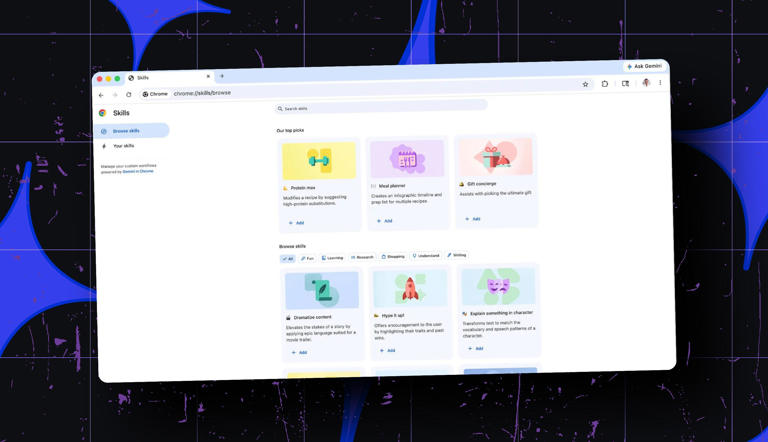
The feature supports custom and pre-built workflows for tasks like recipe adjustments, product comparisons, and document summarization.
Initially rolling out to Chrome desktop users with US English settings, Skills aim to streamline repetitive browsing tasks and integrate AI more deeply into daily web use.
This move by Google comes amidst a burgeoning landscape of AI integration in browsers, with notable competitors such as OpenAI's Atlas, Perplexity's Comet, and The Browser Company's Dia also entering the fray.
Google’s new 'Skills' feature in Chrome transforms frequently used AI prompts into persistent, one-click tools within its Gemini integration.

Unlike previous workflows that required retyping prompts, Skills can be saved directly from chat history and triggered via a forward slash or plus button.
This shift reflects a broader move from AI as a reactive chat interface to a proactive utility embedded in everyday browsing.
Using Skills is easy, because you can save an AI prompt as a Skill from your chat in Gemini, and to use it, just type (/) or click the (+) button in Chrome.
The Skill will run on the page you’re viewing and other tabs you choose, but you can also edit your Skills anytime, so they always fit what you need.
Early testers have applied Skills to tasks like calculating protein macros, generating side-by-side product comparisons, and summarizing lengthy documents.
Google’s Skills library offers pre-built workflows for shopping, productivity, budgeting, and more, all of which can be customized.
This versatility positions Skills as a flexible automation layer for both casual and power users.
Skills integrate directly into Chrome’s interface, eliminating the need to switch apps and maintaining browsing context.
In 'Agent Mode,' Gemini can autonomously choose and execute Skills to achieve multi-step goals, suggesting a future where the browser handles more cognitive tasks.
This native integration could give Chrome a competitive advantage over AI tools that operate as separate applications.
Skills are launching first for Chrome desktop users signed into Google accounts with US English set as their language, with gradual expansion to other regions.
They work with both free Gemini accounts and Google One AI Premium subscriptions, syncing across devices without extra installation.
Google has not provided a timeline for full global rollout, but early access is already live for some users.
Initially, the feature will be operational exclusively when the Chrome browser's language setting is configured to English (US).